Applied AI Live
A gathering of live players in the applied AI economy, sharing field notes and pulling newcomers into the work.
What Is It?
Applied AI Live is a recurring event format built around a simple idea: the people who are actually thriving in the applied AI economy are live players (Samo Burja's term for people who can do things they haven't done before). They are rapidly evolving their techniques, finding new opportunities, and building real knowledge through practice. Applied AI Live puts those people on stage.
The goal: create a Schelling point where live players share field notes with each other and with newcomers, democratizing what they're learning in real time. The practitioners who present aren't lecturing from a fixed playbook. They're reporting from the front lines of a field that changes every week. The audience doesn't just learn what's possible. They get pulled into the current.
The format is evolving. Early events featured live whiteboard architecture sessions (a business owner presents a problem, a practitioner architects a solution on the spot). That may continue in some form, but the core is becoming clearer with each event: practitioners sharing honest field notes, getting attendees up to speed on what's actually working, and co-shepherding each other through a landscape that moves fast.
Each event features some combination of:
- Practitioner field notes: Real case studies, lessons learned, techniques that are working right now
- Live problem-solving: Business owners present real problems, practitioners think through solutions together
- Networking: Time for attendees to connect, compare notes, and find collaborators
This isn't a lecture series. It's a room full of people who are actively figuring this out, sharing what they know so everyone moves faster.
Who Should Attend?
Four types of people:
| Type | Description |
|---|---|
| AI-Native Young People | People in their early 20s who use AI tools daily and want to apply that fluency professionally. Students, recent grads, career changers. You don't need to be a traditional coder. |
| Experienced Practitioners | Engineers and practitioners who are already doing the work. Your experience is invaluable to the young people in the room, and you'll learn from their fresh perspective too. |
| Business Owners | People with real business problems who want to understand what's possible and find trustworthy help. |
| Tool Builders | Technical leaders building platforms, frameworks, or infrastructure for applied AI. Looking for practitioner feedback. |
Running an Applied AI Live Event
This playbook is a work in progress. Component guides:
Available Now
| Playbook | Description |
|---|---|
| Presenting at Applied AI Live | Guest presenter guide: case study talks and topic discussions |
| Live Architecture Session | Finding the right business owner and prepping the engineer |
| Finding a Venue | Securing a recurring partner space (aim for seated capacity slightly above expected attendance; slight crowding creates energy, but most people should be able to sit) |
| Finding a Photographer | Sourcing affordable, reliable event photography |
| Recording an Event | Capturing video on a budget |
| Case Study Interviews | Interviewing practitioners to create profiles |
| Generating Flyers | Brand-consistent event flyers via Remotion |
| Writing Event Descriptions | Crafting event listing copy for Luma, Meetup, etc. |
| Event Promotion | Getting the word out and filling the room |
| Speaker Outreach | Finding and recruiting practitioners to present |
Master Checklist
A high-level view of everything that goes into running an Applied AI Live event. Links point to detailed guides where available.
4+ Weeks Before
- Secure venue (partner space preferred). See Finding a Venue
- Confirm practitioner speaker for case study. See Case Study Interviews
- Find business owner for live architecture session. See Live Architecture Session
- Confirm practitioner to architect the solution
- Create event page (Meetup and/or Luma). See Tools
- Write event description. See Writing Event Descriptions
3 Weeks Before
- Start promoting the event (social, community channels, word of mouth)
- Submit event to relevant Luma Featured Calendars (see Luma Calendar Submissions)
- Generate event flyer. See Generating Flyers
- Confirm photographer. See Finding a Photographer
- Figure out recording setup. See Recording an Event
- Order name tags (blank or color-coded by role)
- Order branded staff shirts (see Branded Shirts)
2 Weeks Before
- Conduct pre-call with business owner
- Write problem brief from pre-call. See Live Architecture Session
- Send problem brief to engineer
- Continue promoting and accepting RSVPs
- (Optional) Schedule food delivery
1 Week Before
- Create the internal run-of-show document (see Run-of-Show as Internal Doc)
- Create outreach messages doc with personalized texts for each speaker and helper (see Outreach Messages)
- Reconfirm with photographer and videographer. Rebook the same videographer when possible (see Videographer Consistency).
- Pick up name tags if not delivered
- (Optional) Confirm food delivery plan
- Test full AV setup at the venue (speaker, mic, laptop, display). Do not skip this. Bring backup gear.
- Reconfirm with all speakers
Day Of
- Send a hype video and/or reminder blast in the morning (see below)
- Send outreach messages to each speaker and helper (see Outreach Messages)
- Setup crew arrives 1 hour before doors open. Minimum 3 people: host, door/registration person, and vlog/camera person. Brief each person on their specific role before doors open.
- Set up chairs, registration table (laptop + name tags), recording equipment, and food spread
- (Optional) Confirm food delivery and arrange spread
- Set computer to never sleep/hibernate
- Test both mics and the speaker
- Charge portable speaker and queue up music playlist
- Brief photographer, videographer, and vlog person (see Vlog Person Role)
- Start screen recording on the presentation laptop (see Audio/Visual)
- Vlog person begins capturing B-roll and early arrival interviews 30 min before doors
- Door person stationed at registration from doors open through start of program (see Door Person)
- Run the event (see Run of Show below)
- After the program, put music on for the networking hour. Host actively introduces people to each other.
- Vlog person captures post-event interviews with speakers and attendees
- Clean up and thank venue staff
The morning hype video: If your event is in the evening, record a quick video that morning. Post it to social and send it to RSVPs. Get people excited. Remind them this isn't a normal meetup. Cover what's happening, why it matters, and what they'll get out of attending. Bonus: film it at or near the venue. Show them where to park, which entrance to use, any logistical details that reduce friction. A personal video converts more RSVPs into actual attendees.
The day-of reminder blast: In addition to (or instead of) a video, send a written blast to your RSVP list the morning or midday of the event. Paint a picture of what attending means for them. At Applied AI Live #1, a blast went out at 11:29 AM with the subject line “For many of you, tonight is the night that changes everything” (a future-looking message that asked RSVPs to imagine looking back a year from now on all the clients, friendships, and partnerships that started that night). It closed with urgency without pressure: “If you can't make it tonight, that's okay, we're going to have more events. But I think you're going to want to be here for the launch.” This likely contributed to the 40% show rate (above the typical ~35%). Make it personal, make it vivid, and send it early enough that people can adjust their evening plans.
After the Event
- Thank partners, speakers, and volunteers
- Share photos and recording with attendees
- Collect feedback
- Update this playbook with lessons learned
Budget
Applied AI Live events should be cheap to run. The goal is replicability. Any chapter should be able to host one without a huge budget.
Food is completely optional. A great first event needs good speakers, a venue, a working mic, name tags, and branded shirts for your team. Everything else is a nice-to-have. Don't let the extras slow you down or stop you from hosting.
Real costs from Applied AI Live #1 (~100 attendees):
| Category | Actual Cost |
|---|---|
| Venue | $0 (partner venue) |
| Food (Firehouse Subs, small platters) | ~$250 |
| Videography + photography (one person) | ~$300 |
| Branded shirts (10, for staff/volunteers/speakers) | ~$100–150 |
| Printed flyers | ~$70 |
| Name tags (Minuteman Press) | ~$50 |
| Registration desk | $0 (volunteers) |
| Total | ~$770–820 |
Budget roughly $1,000 for an Applied AI Live event. This assumes a free venue through partnerships, which is why partnerships are so important (see Building Partnerships). If you handle your own photos/video and skip food and name tags, you can run leaner. But don't skip the shirts.
The Human Cost
Ideally, the organizer's time and any volunteer help (photography, registration, etc.) isn't “paid for” in the traditional sense. The value is intrinsic: these are people who genuinely want to network with this community. Running or helping with the event gives them access and credibility.
Find people who want to be there anyway. The photographer who's an aspiring applied AI practitioner. The volunteer who wants to meet business owners. That's the model.
On Sponsorship
Sponsorship gives you more flexibility, but it's not a precedent you need to set. The beauty of keeping events cheap is that any chapter can run them without waiting for funding. Sponsorship is a nice-to-have, not a requirement.
The Applied AI Society is supported by founding sponsors OpenTeams and OT Incubator. Learn more about our founding sponsors.
Example Run of Show
A typical 2-hour Applied AI Live event:
| Time | Segment |
|---|---|
| 5:30 PM | Doors open. Networking. (Food out if providing it.) |
| 6:00 PM | Welcome + housekeeping (5 min) |
| 6:05 PM | Sponsor remarks or short opener (10 min max) |
| 6:15 PM | Practitioner field notes: Case study with Q&A (30 min) |
| 6:45 PM | Second segment: Another practitioner, live problem-solving session, or open discussion (30 min) |
| 7:15 PM | Open networking |
| 7:30 PM | Wrap |
Expanded Format for 3+ Speakers
Once you have three or more speakers, the format benefits from more structure. The proven flow:
| Time | Segment |
|---|---|
| 5:30 PM | Doors open. Networking, food, music. Vlog person captures B-roll and early arrival interviews. |
| 6:00 PM | Welcome + housekeeping + sponsor recognition (see Sponsor Recognition) (10 min) |
| 6:10 PM | Speaker 1: individual segment with Q&A (20-25 min) |
| 6:35 PM | Speaker 2: individual segment with Q&A (20-25 min) |
| 7:00 PM | Short break (10 min) |
| 7:10 PM | Keynote/featured speaker talk (10-15 min) |
| 7:25 PM | Sit-down Q&A with keynote speaker and host (15 min) |
| 7:40 PM | Host reinvites other speakers back on stage for open discussion (15 min) |
| 7:55 PM | Closing: thank speakers, sponsors, attendees. Repeat sponsor recognition (shorter version). (5 min) |
| 8:00 PM | Open networking with music (1 hour). See Post-Event Networking Hour. |
This format gives each speaker their own spotlight, builds toward the keynote, and ends with a collaborative panel that brings the full group together. The open discussion at the end often produces the most interesting moments because speakers riff off each other's earlier talks.
Adjust based on your speakers, venue, and what your community responds to. The format is evolving. The through-line is live players sharing real field notes. Protect time for that.
Key lesson from Live #2: don't open with a long technical presentation. The opening segment sets the energy for the whole event. If your first speaker runs long or isn't dynamic, the room deflates before the good stuff starts. Keep the opener short (10 min max) and high-energy. Save longer, deeper segments for after the audience is warmed up. If your strongest speaker is going second, that's fine, but make sure the first segment doesn't drain the room.
Prioritize live demos over abstract talk. Attendees want to see how things actually work. A practitioner showing their agent architecture in real time, walking through their actual workflow, or demoing a tool live is far more compelling than slides describing the same thing. When recruiting speakers, ask: “Can you show us, not just tell us?” The best Applied AI Live segments are the ones where the audience can see the work happening.
On speaker selection: You need at least one charismatic speaker per event, or a strong moderator who can carry the energy. You don't need both, but you can't have neither. If a speaker has deep expertise but isn't a dynamic presenter, pair them with a moderator who can ask sharp questions and keep the pace up.
Tip: Use auto-rotating animated slides during downtime and transitions (doors open, breaks, networking). This keeps the screen active with branding, sponsor info, or upcoming announcements instead of a static or blank display. It fills dead air visually and keeps energy in the room.
Sponsor Recognition
Don't just mention sponsors by name. Give them real airtime and context.
In the opening (2-3 sentences per sponsor): Explain what each founding sponsor does and why their work matters to this community. Example: “OpenTeams is building open-source AI infrastructure that organizations fully own and control. OT Incubator accelerates the creation of amazing companies that contribute to open source. These aren't just logos on a flyer. These are partners whose vision matches the scale of the moment.”
In the closing (shorter callback): “None of this happens without [sponsors]. If you're a practitioner building with open-source tools, check out OpenTeams. If you're building a company, talk to OT Incubator.”
Sponsors who feel genuinely appreciated (not just name-dropped) are sponsors who come back.
Setup Crew
Arrive 1 hour before doors open with a minimum of 3 people:
| Role | Responsibilities |
|---|---|
| Host | Oversees setup, tests AV, reviews run of show, prepares speaker intros |
| Door/Registration person | Sets up the registration table, organizes name tags, prepares the check-in laptop |
| Vlog/Camera person | Sets up recording equipment, tests angles, begins capturing B-roll before doors |
Set up chairs, the registration table (laptop + name tags), recording equipment, and the food spread. Test mics and the speaker system. Brief each person on their specific role before doors open. Everyone should know exactly what they're responsible for so the host can focus on the program.
Vlog Person Role
This is separate from the main stationary camera. The vlog person is mobile and social. Their job starts 30 minutes before doors open:
- Before doors: Capture the venue setup, behind-the-scenes moments, the team getting ready
- During arrivals: Mingle with early arrivals, film short interviews (“What are you hoping to get out of tonight?”), and make people feel welcome. This person doubles as a greeter.
- During the program: Capture audience reactions, speaker moments from different angles, and candid shots that the stationary camera misses
- After the program: Capture post-event interviews with speakers (“What surprised you about the questions tonight?”) and attendees (“What was your biggest takeaway?”)
This content feeds the social media engine. Short clips from these interviews become the promotional material for the next event.
Videographer Consistency
Rebook the same videographer when possible. They learn the venue layout, the event format, the best camera angles, and the lighting conditions. This means less setup time, fewer surprises, and steadily improving production quality. Consistency in production compounds over time. A videographer who has filmed three of your events will produce dramatically better content than one filming their first.
Door Person
Station a dedicated person at the registration table from doors open through the start of the program. This role is critical for first impressions.
What they do:
- Greet every arrival warmly
- Check them in on Luma (or your registration platform)
- Hand out the correct name tag
- Tell people: “We'll get started around [time]. Feel free to mingle and grab food.”
- If someone arrives alone and looks unsure, introduce them to someone nearby. “Hey, have you met [name]? They're also working on [topic].”
The door person should be outgoing and genuinely enjoy meeting new people. This is the first human interaction most attendees have with your community. Make it count.
Run-of-Show as Internal Doc
Create a run-of-show document for every event. This is an internal planning doc, not shared publicly. It keeps the host, crew, and speakers aligned.
What to include:
- Exact timeline with specific times for every segment
- Key people table: name, role, and contact info for everyone involved (speakers, crew, videographer, venue contact)
- Detailed talking points for the host's intro of each speaker. Don't wing the intros. Write out exactly what you'll say about each person and why their talk matters.
- Sponsor hype talking points for both the opening and closing (see Sponsor Recognition)
- Contingency notes: what to do if a speaker runs long, if AV fails, if the keynote cancels
Share this doc with your crew (not speakers) so everyone knows the full picture.
Outreach Messages
Create a separate outreach messages doc with copy-pasteable personalized texts for each speaker and helper. Send these on event day morning or the night before.
For each person, include:
- A personalized message with what they specifically need to know about their role and timing
- The Google Doc link to the run of show (for crew) or their specific time slot and logistics (for speakers)
- Parking and entrance instructions
- Your phone number for day-of coordination
Example for a speaker: “Hey [Name], excited for tonight. You're on at 6:35 PM, right after [Speaker 1]. Plan to arrive by 5:45 so we can get you set up and mic-checked. Here's the run of show: [link]. Parking is in the garage on [street], enter through the side door. Text me when you're close.”
Example for the door person: “Hey [Name], thanks for handling registration tonight. Doors open at 5:30, so please be set up by 5:15. Here's the full run of show: [link]. Your job is to check people in on Luma, hand out name tags, and point people toward the food and networking area. If someone looks lost, introduce them to someone. You're done once the program starts at 6:00.”
Post-Event Networking Hour
After the program ends, put the music back on and explicitly tell the room: “We're going to hang out for another hour. Stick around, meet people, and keep the conversations going.”
This is where the real relationships form. During the program, people are in audience mode. During the networking hour, they're in connection mode.
The host's job during this hour:
- Actively introduce people to each other. “You should meet [person]. They're working on something similar to what you described.”
- Connect speakers with attendees who had questions they didn't get to ask
- Make sure no one is standing alone. If someone looks like they're hovering, bring them into a conversation.
- Stay until the end. If the host leaves early, the energy drains out of the room.
Audio/Visual
Keep it simple, but battle-test everything before event day. Sound issues are the #1 complaint from attendees. A room full of excited people with no working mic kills the energy fast.
The basics:
- A handheld mic or portable speaker so presenters can be heard
- A screen or TV if someone is presenting slides (optional)
- Whiteboard or large sticky notes for live architecture sessions
Many venues provide basic AV. Ask during your venue walkthrough.
Non-negotiable: test your full AV setup at the venue before event day. Don't discover problems during the event. Bring your speaker, mic, and laptop to the venue at least a day before and run through the setup end to end. If the venue provides AV, confirm it works with your equipment.
Bring backup gear. A second mic, a backup speaker, extra cables. When something fails mid-event (and eventually it will), you need a fallback that takes seconds to deploy, not minutes.
Lessons from Live #1 and #2:
- Set your computer to never sleep/hibernate. At Live #1, the computer went to sleep mid-presentation. Change your power settings before the event starts.
- Bring a backup mic. Only one of our two mics worked at Live #1. The workaround: the host spoke loudly without a mic so the guest could use the single working mic. It worked, but having a backup would have been better.
- TV/display connectivity can be finicky. The TV required on/off cycling to connect to the laptop. Test this during setup, not during the event.
- Sound system failure at Live #2. The primary speaker system didn't work, and a volunteer had to go buy a replacement mid-event. This is preventable. Test your audio setup at the venue beforehand.
If the room is small enough (under 30 people) and acoustics are good, you might not need a mic at all. But for larger groups or noisy spaces, make sure speakers can project.
Screen recording for post-production: Run screen recording software on the presentation laptop during all speaker segments. This gives your video editor a clean capture of exactly what was on screen, which they can overlay onto the camera footage in post. Without this, the audience sees a presenter pointing at a screen they can't read. One laptop for all presentations makes this simple: start recording before the first speaker, stop after the last one. Recommended tool: Screenflick (Mac, one-time purchase). OBS (free, cross-platform) also works.
For recording considerations, see the Recording an Event playbook.
Music
Background music during networking windows (doors open, breaks, post-event) makes a huge difference. A quiet room feels awkward. Music sets the vibe and gives people permission to talk.
The setup:
- A portable Bluetooth speaker, plugged in so it doesn't die
- Volume low enough that people can talk without raising their voices
- Kill the music when someone is on mic
What to play:
- No lyrics. Instrumental, lo-fi, or ambient works best. Lyrics compete with conversation.
- Chill but energetic. You want warm, social energy, not a library or a club.
- Curated playlists beat random radio. Pick something ahead of time and let it run.
Recommended playlists:
- Spotify: Lo-Fi Beats (instrumental, low-key, crowd-tested)
- YouTube: Lo-Fi Girl livestream (reliable fallback, always on)
Add “Charge portable speaker” and “Queue up music playlist” to your Day Of checklist.
Name Tags: Color-Coded by Role
Name tags are important. At minimum, use simple blank adhesive name tags so people can write their name. This alone makes networking dramatically easier. Color-coded role tags are an upgrade, not a requirement.
The Upgrade: Color-Coded by Role
If you want to go further, color-code name tags by attendee type. The goal is to help people find each other. A young AI native looking for experienced practitioners to learn from should be able to spot them across the room. A business owner looking for talent should know who to approach.
The Ideal
Printed name tags with:
- Role at the top: “AI Native,” “Practitioner,” “Business Owner,” or “Tool Builder”
- Event name at the bottom: “Applied AI Live”
This way people know who they're talking to and remember what event they met at.
The Easy, Cheap Version
Four different colors of blank name tags. Assign one color per role. Announce the color coding at the start of the event.
| Color | Role |
|---|---|
| 🟡 Yellow | AI Native |
| 🟠 Orange | Experienced Practitioner |
| 🔵 Blue | Business Owner |
| 🟢 Green | Tool Builder |
(Pick whatever colors are available. Just be consistent.)
Where to Get Them
Blank adhesive name tags come in multi-color packs. Check Amazon or any office supply store. A pack of 200 costs ~$10.
Custom Printing
For custom name tags or sticker sheets, local print shops offer fast turnaround (often 2 days). Expect ~$90 for 72 custom stickers. Services like Sticker Mule work well for bulk orders. Minuteman Press is another reliable vendor for custom printing with locations nationwide.
At Applied AI Live #1, attendees called the custom name tags out as a highlight. They made the purpose of the event immediately legible. Don't underestimate this detail.

Conversation starter stickers are a nice add-on. Small stickers people can add to their name tags like “Ask me what I'm building” or “Open to work” help break the ice.
Branded Shirts
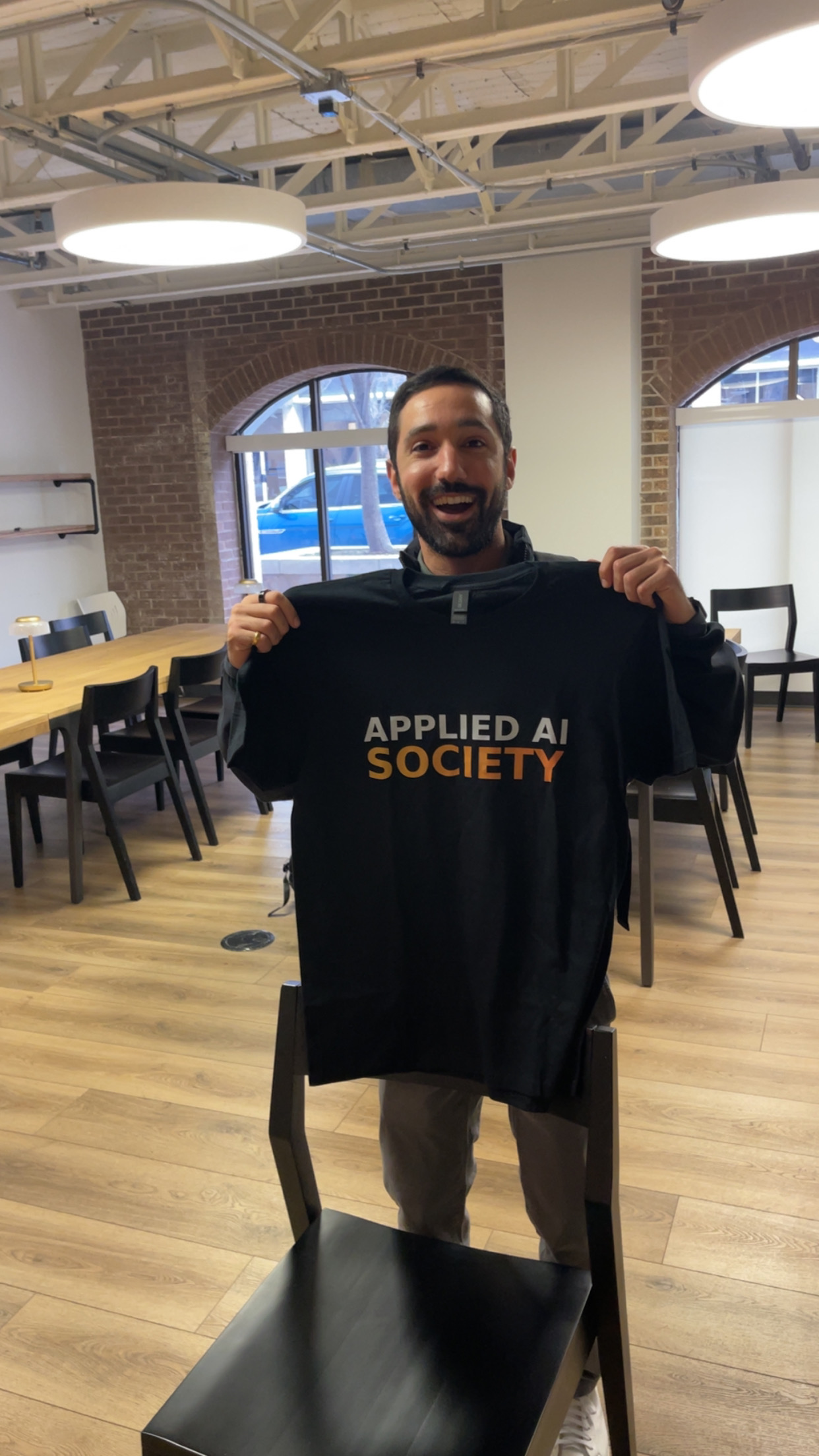
Don't skip this one. Branded shirts are one of the highest-ROI things you can do. Attendees walk in and immediately see an organized team. It signals that this isn't a casual hangout; it's a real event run by real people.
How to get them: Send any local print shop the AAS logo and ask for black shirts in a range of sizes. That's it. At Live #1, we ordered ~10 shirts for ~$100 (white text, orange gradient on black). Minimalistic and clean.
Order them 3+ weeks before your event to allow for printing and shipping. Keep the design simple. The brand should be recognizable but not loud.
Food & Drinks
Food is not required. If your budget is tight or you're testing the waters with a first event, skip it. People come for the speakers and the community, not the sandwiches. You can always add food once you've proven the format works.
Keep it thrifty and replicable. The goal is programming valuable enough that people come for that, not fancy catering.
The Default: Subs or Pizza
For a 5:30–7:30pm event, people will be hungry. Options:
| Option | Notes |
|---|---|
| Jimmy John's subs | Cut into pieces. Include vegan options. ~$8–10 per sub. |
| Firehouse Subs | Proven at Live #1. ~$250 for a large group. Include veggie options. Substantial and crowd-pleasing. |
| Pizza | Classic engineer event food. Cheap. Everyone knows what to expect. |
| Small bites | Cheese, meats, vegetables, small sandwiches. More upscale but pricier. |
Have food ready 25 minutes before doors open. Early arrivals set the social tone for the whole event. When people walk in to food already laid out, they start networking immediately instead of standing around waiting. Always include veggie options.

How Much?
For free events, expect 50% of RSVPs to actually show up. If you have 100 RSVPs, plan food for 50.
Don't advertise it as a dinner event. Frame it as “light food provided” or first-come-first-serve.
Drinks
- Cases of bottled water (~$5–10)
- Cups for people who prefer using a water fountain
- No need for anything fancier unless the venue provides it
Registration
Setup
- Laptop with Luma (or your registration platform) open
- Name tags (blank or sorted by color/role)
- One or two people at the desk
Flow
- Attendee arrives
- Check them in on Luma
- Hand them a name tag
- Point them toward the networking area
Having an extroverted “connector” person near registration helps. Someone who can introduce newcomers to each other and break the ice.
Luma Calendar Submissions
One of the most effective (and free) ways to get attendees is submitting your event to Luma Featured Calendars. These are curated community calendars that surface events to subscribers interested in specific topics or cities.
Why This Matters
When you create an event on Luma, it lives on your personal page by default. Most people won't find it unless you share the link directly. But Luma also has a Discover page with Featured Calendars (topic-based like “AI” or “Tech”) and Local Events (city-based like “Austin” or “San Francisco”). Getting your event listed on these calendars puts it in front of thousands of subscribers who are already looking for events like yours.
At Applied AI Live, we've seen real attendees come from Luma calendar discovery. OpenClaw Meetups, for example, appears as a Featured Calendar on Luma's Discover page. The Austin local calendar is another one worth targeting.
How to Submit
- Go to lu.ma/discover and browse the Featured Calendars and Local Events sections
- Find calendars relevant to your event (AI, Tech, your city)
- Open the calendar page and look for a “Submit Event” option
- Fill in your event details and submit
- The calendar admin reviews your submission. If approved, your event appears on that calendar's public schedule
Which Calendars to Target
| Calendar Type | Examples | Why |
|---|---|---|
| Topic calendars | AI, Tech, Open Source | Reaches people interested in the subject matter |
| City calendars | Austin, San Francisco, New York | Reaches local attendees who are browsing for things to do |
| Community calendars | OpenClaw Meetups and other aligned community calendars | Reaches aligned communities with overlapping interests |
Tips
- Submit early. Do this 3+ weeks before your event. Calendar admins may take a few days to review submissions.
- Write a strong event description. Calendar admins are curating quality. A well-written description with clear value proposition gets approved faster. See Writing Event Descriptions.
- Submit to multiple calendars. Your event can appear on several calendars at once. Cast a wide net.
- Subscribe to calendars yourself. Follow the calendars in your city and topic area. This helps you stay aware of what other organizers are doing and spot collaboration opportunities.
Cleanup
Before you leave:
- Collect leftover food (offer to attendees first)
- Gather trash, dispose properly
- Return furniture to original positions
- Check for any personal items left behind
- Thank venue staff
Most venues appreciate when you leave things cleaner than you found them. It helps with future partnerships.
Thanking Partners
Gratitude is key. After an event, take time to thank the people who made it happen:
- Venue hosts
- Speakers and presenters
- Volunteers who helped with registration, photos, or setup
- Sponsors
- Community partners who helped promote
A quick thank-you text is fine. A voice note is better. A heartfelt voice note ecard is memorable.
Tool recommendation: Blessout lets you send voice note ecards. Record a genuine thank-you, pick a visual, and send. Takes 2 minutes. Makes people feel appreciated.
Partnerships compound. The venue that felt thanked is more likely to host you again. The speaker who felt valued will refer other speakers. Small gestures build long-term relationships.
Past Events
Applied AI Live #2, Austin, TX (February 2026) Hosted at Grain & Berry with AITX community. Featured Reid McCrabb and Jack Moffatt (Linkt, agentic GTM case study), Mahaveer Dharmchand (IBM Watson, enterprise AI perspective), and a guardrails panel with Stephanos Nicklow, Patrick Skinner, and Jack Moffatt on GRC for agentic systems. ~80 check-ins with a 36% show rate. The Linkt case study and OpenClaw guardrails panel were standout segments.
Applied AI Live #1, Austin, TX (January 2026) Hosted at Antler VC with AITX community. Featured Travis Oliphant (creator of NumPy/SciPy, founder of OpenTeams) and Rostam Mahabadi (AITX x NVIDIA Hackathon grand prize winner). ~100 check-ins with a 40% show rate (above the typical ~35% for similar meetups). Debuted a custom Q&A platform with QR codes on every slide and AI moderation using the NumFOCUS code of conduct.
Start a Chapter
Want to run Applied AI Live in your city? See Starting a Chapter for the full guide on launching a chapter, what national provides, and what's expected of you.