Generating Brand Assets with AI
How to use Gemini, Midjourney, DALL-E, or other image generators to create on-brand graphics for Applied AI Society materials.
Master Prompt
Copy this as your base. Attach the style reference images below. Then add what specific asset you need at the end.
I need to create a graphic for "Applied AI Society," a community for AI practitioners.

BRAND STYLE:
- Warm, inviting, optimistic, nature-inspired
- Think Windows XP rolling hills, pastoral sunrise vibes
- NOT techy, NOT futuristic, NOT sci-fi, NO circuits/grids/nodes
- Feels human, grounded, welcoming (like a positive natural progression)

COLORS (use these exact hex codes):
- Orange #E67B35 (primary brand color)
- Yellow/Gold #FFC14D (gradients, sun, accents)
- Cream #FAF7F1 (warm backgrounds, never pure white)
- Olive Green #5B6E4D (hills, nature elements)
- Dark #1A1A1A (text, contrast)

STYLE KEYWORDS: soft gradients, minimal, layered hills, sunrise glow, stylized/illustrated (not photorealistic)

BACKGROUND STYLE: Warm cream with subtle paper/linen texture, soft natural lighting
like watercolor paper. NOT pure white, NOT flat digital background.

TYPOGRAPHY (if generating text):
- Font: Bold geometric sans-serif (Helvetica Neue Bold, Arial Bold)
- Main text color: Dark #1A1A1A
- Highlighted phrases: Orange #E67B35
- Style: Clean, professional, good letter spacing, readable
- Use curly quotation marks (" ")

AVOID: circuits, grids, nodes, networks, neon, glowing tech, metallic, cold, clinical, dystopian, sci-fi, pure white backgrounds, decorative/script fonts for main text

[ATTACH: rolling-hills.png and sun.png as style references]

---

WHAT I NEED: [Describe the specific asset here, e.g., "A 16:9 banner with hills at bottom, sunrise glow at top, space for text overlay"]
Style References
When prompting AI image generators, attach these as style references:
Paper Background Texture

Download for reference: paper-background.png
Style notes: Soft cream/off-white with subtle paper grain, organic texture, warm natural lighting feel
Rolling Hills

Download for reference: rolling-hills.png
Style notes: Soft gradients, olive greens (#5B6E4D), gold accents (#E8B923), layered hills, stylized/not photorealistic
Sun
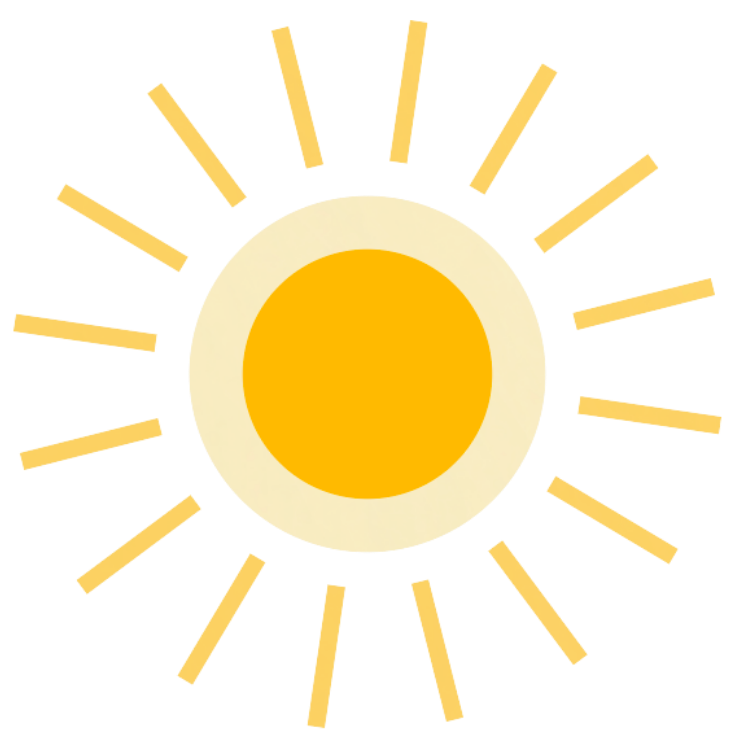
Download for reference: sun.png
Style notes: Simple radial shape, gold center (#E8B923), cream/warm glow, minimal details
Logo Examples


Color Palette for Prompts
Include these colors in your prompts:
| Name | Hex | Description |
|---|---|---|
| Orange | #E67B35 | Primary brand color |
| Yellow/Gold | #FFC14D | Gradients, sun elements |
| Cream | #FAF7F1 | Warm backgrounds |
| Olive Green | #5B6E4D | Hills, nature elements |
| Dark Text | #1A1A1A | Contrast elements |
Full Example: Quote Graphic
Here's a complete, copy-pastable prompt for creating a quote graphic with a person photo:
Create a quote graphic for social media.

LAYOUT:
- Landscape format (16:9 or similar)
- Person photo on the LEFT side (I am attaching their photo)
- Quote text on the RIGHT side
- Subtle rolling hills silhouette along the bottom edge

BACKGROUND:
- Warm cream/off-white with subtle paper texture (like watercolor paper or linen)
- Soft, organic grain. NOT flat digital white
- Very faint warm tones, natural lighting feel

BOTTOM ELEMENT:
- Stylized rolling hills silhouette in olive green (#5B6E4D) with gold (#FFC14D) accents
- Hills should be at the BOTTOM of the image, BEHIND/BENEATH any person
- Person should appear in front of the hills (hills are background layer)
- Hills should be subtle, fading into the background. Not dominant
- Soft gradients, layered depth

STYLE:
- Warm, inviting, professional
- Nature-inspired, pastoral vibes (think Windows XP wallpaper but warmer)
- NOT techy, NOT futuristic, NO circuits/grids/nodes
- Soft and organic, not sharp or digital

COLORS:
- Background: Cream #FAF7F1 with paper texture
- Hills: Olive #5B6E4D with gold #FFC14D highlights
- Any accent elements: Orange #E67B35

TEXT (generate this in the image):
- Main quote in a bold, geometric sans-serif (like Helvetica Neue Bold or Arial Bold)
- Quote text color: Dark #1A1A1A
- Key phrase can be highlighted in Orange #E67B35
- Attribution/name in slightly smaller text below the quote
- Use curly quotation marks (" ")

TYPOGRAPHY STYLE:
- Clean, professional, modern but warm
- Good letter spacing, readable
- NOT decorative or script fonts for the main quote

LAYOUT for text:
- Quote on the RIGHT 60% of the image
- Person photo on LEFT 40%

[ATTACH:
- paper-background.png (background style reference)
- rolling-hills.png (hills style reference)
- Photo of the person to feature
]
Example “WHAT I NEED” Additions
Start with the Master Prompt above, attach the style references, then replace [Describe the specific asset here] with one of these:
Social Media Banner
A wide banner (16:9) with stylized rolling green hills in the foreground
and a warm sunrise in the background. Space for text overlay in the center.
Event Graphic Background
Abstract warm background with subtle rolling hill shapes at the bottom edge.
Sunrise glow from the top. Lots of space for text overlay. Vertical format (9:16).
Icon
A simple, minimal icon representing [TOPIC]. Rounded edges, soft, approachable.
Single color (orange #E67B35) on transparent background. 256x256px.
Presentation Slide Background
Subtle background for a presentation slide (16:9). Cream base with very faint
olive green hill silhouettes at the bottom edge. Minimal, should not distract from text.
Social Post Square
Square image (1:1) for Instagram/LinkedIn. Rolling hills composition with
sunrise glow. Leave center area clear for text overlay.
Need Help?
If you're creating materials for an official Applied AI Society event or chapter, reach out to the team for guidance or custom assets.